Valorant spoofer, how HWID bans work and what a hardware ID changer actually does
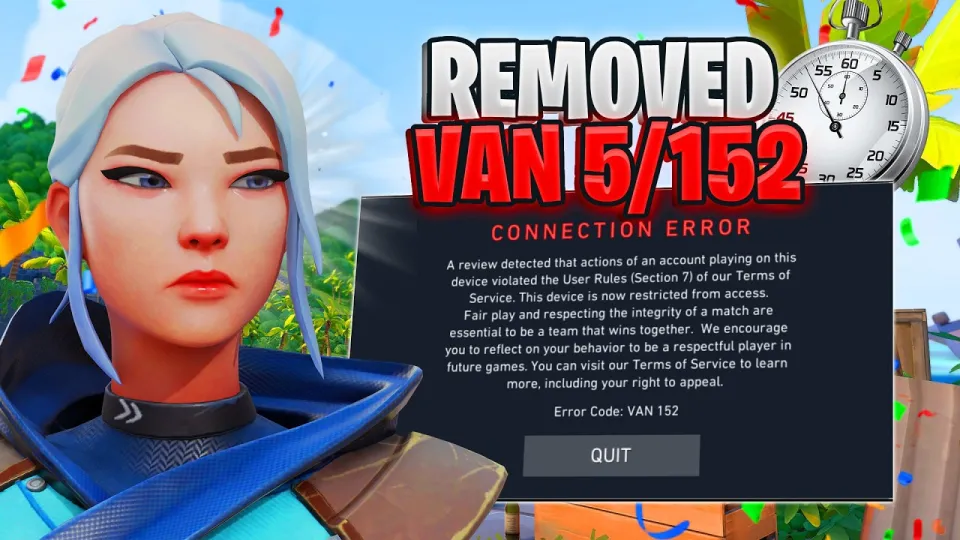
Video: This Valorant HWID Spoofer Actually Works… Full Showcase (Valorant Spoofer)
· based on the channel medi__posh
Key takeaways
- Riot's Vanguard collects hardware identifiers such as disk serials, SMBIOS/BIOS data, MAC addresses and GPU/ motherboard IDs to tie an account to a machine.
- An HWID spoofer temporarily replaces those identifiers in the registry, drivers and kernel layer so the game reads a different fingerprint.
- The showcased tool (S.W.R Solution) advertises a roughly 2-minute setup: install, configure, run the spoof, then launch Valorant.
- Spoofing is a violation of Riot's Terms of Service and can lead to new bans; most spoofers also require disabling or conflicting with Vanguard.
- HWID bans are usually applied to repeat or severe offences, including cheating and ban evasion, not to a first-time account ban.
A Valorant spoofer is a tool that changes the hardware identifiers Riot's anti-cheat reads from your PC so that a machine previously flagged with an HWID ban appears to be a different computer. It does not unban an account: the account itself stays banned, and the spoofer only aims to let a new account run on the same hardware. Tools marketed for this purpose, such as the S.W.R Solution build promoted as the Valorant HWID spoofer package, typically bundle a loader, a configuration panel and a short set of steps performed before the game is launched.
What an HWID ban in Valorant actually is
An HWID (hardware ID) ban is a block applied to the physical machine rather than to a single account. Riot's Vanguard anti-cheat gathers a fingerprint of the system at start-up and on session checks; when that fingerprint matches one linked to a banned account, new accounts on the same PC can be restricted quickly, sometimes within minutes of play. The point is to stop a removed cheater from simply registering a fresh account and continuing on the same computer.
In practice, HWID bans are not the standard punishment for a first offence. A normal account ban removes access to that account only. Hardware-level flags appear in cases Riot treats as repeat or serious: detected cheat software, deliberate ban evasion, or accounts repeatedly linked to the same machine after earlier bans. That distinction matters, because a spoofer is useless for a simple account ban and only relevant once the hardware itself has been flagged.
Which identifiers a spoofer has to change
A working spoof has to cover every value Vanguard can read, not just one. The identifiers commonly collected and commonly targeted by spoofers include:
- Disk and volume serial numbers, including the system drive and secondary drives.
- SMBIOS and BIOS data: motherboard and system UUIDs, manufacturer strings, BIOS version and date.
- The Windows MachineGuid and related registry keys under `HKLM\SOFTWARE\Microsoft\Cryptography`.
- Network adapter MAC addresses and, on some setups, the associated network profile identifiers.
- GPU and monitor identifiers, plus volume IDs tied to installed drives.
- Product IDs, computer name and installation-time values that persist across reboots.
A tool that changes only the MachineGuid or only the disk serial is easy to detect, because the remaining values still match the flagged profile. This is why spoofers are usually described as changing a set of identifiers at once and why partial spoofs are the most common reason a "fix" appears to fail.
How the showcased spoofer is set up
The S.W.R Solution tool shown by the channel medi__posh follows the pattern most of these utilities use: a loader, a configuration step and a spoof action performed before the game starts. The published walkthrough breaks the process into five stages: introduction, installation, configuration, the spoofing process itself, and launching Valorant. The advertised setup time is about two minutes.
In general terms the sequence looks like this:
- Download the loader from the vendor page and disable antivirus real-time protection, which almost every spoofer requires because the loader writes to kernel-level and registry locations.
- Run the loader as administrator so it can reach the identifiers it needs to rewrite.
- Select the values to change in the configuration panel — disk serials, SMBIOS strings, MAC address and the MachineGuid are the usual options.
- Apply the spoof and let the tool reboot the machine or restart the relevant services.
- Launch Valorant with a new account and check that the game starts normally.
Why a spoof often fails or gets reversed
Most reports of a spoofer "not working" trace back to one of a few causes rather than to the concept itself. The most frequent is an incomplete change: the tool altered the registry but not the disk serial, or the reverse, so the combined fingerprint still matched. The second is persistence: some values, particularly SMBIOS data and drive serials, are rewritten at boot by the firmware or by Windows itself, so a spoof that is not re-applied after a restart disappears.
The third cause is Vanguard's own behaviour. Vanguard runs as a kernel-mode driver and starts with Windows, so it can observe the system before a user-mode spoofer runs. Loading a spoofer while Vanguard is active, or leaving traces such as a modified driver, a leftover service or an unsigned kernel component, is itself detectable. Vendors respond by shipping updated builds that claim compatibility with the current game version, which is why spoofers are sold as subscriptions rather than one-off downloads — the cat-and-mouse cycle forces constant updates.
The risks: account bans, ToS violations and malware
Using a spoofer is a breach of Riot's Terms of Service, and the outcome is not a clean slate. Riot can re-flag a machine, extend restrictions to new accounts, and treat spoofing as ban evasion, which is one of the categories that escalates enforcement. There is no legitimate appeal path for a spoofed machine; the original account remains banned regardless.
There is also a security cost. Spoofers run with administrator or kernel privileges and require antivirus to be turned off, which is exactly the profile of a tool that can install persistent malware, steal credentials or leave a backdoor. Buying from an unknown vendor and running an unsigned loader on a main PC puts far more than a game account at risk. For anyone weighing the trade-off, the honest comparison is a two-minute fix against a machine that may need a full Windows reinstall.
Official alternatives to spoofing
If the goal is to play Valorant again rather than to defeat a hardware flag, the supported route is a new account on a different, unflagged PC — a hardware ban applies to the machine, not to the person. Appeals go through Riot Support and only succeed when the ban was issued in error; a legitimate HWID flag is not lifted because the hardware was changed. For players whose hardware was flagged by mistake, a support ticket with purchase receipts and system details is the only channel that can actually clear the flag.
Vendor links and where to find the tool
The showcased build is distributed through the S.W.R Solution site and its Discord, which is also where support and updates are handled. The two links from the video are:
- Product page and loader download: https://swrsolution.xyz/s/1a2841b5
- Discord support server: https://discord.com/invite/swrsolutionv3
Summary
The Valorant spoofer shown by medi__posh is a hardware ID changer that rewrites disk serials, SMBIOS data, the MachineGuid and network identifiers so a flagged PC looks new, with an advertised setup of about two minutes across install, configuration, spoof and launch. It does not unban an account, it conflicts with Vanguard by design, and it breaks Riot's Terms of Service, with re-bans and malware exposure as realistic outcomes. Anyone who still wants to look at the vendor's package can find the loader and pricing at the S.W.R Solution product page, and the full step-by-step showcase is on the medi__posh channel.
Questions & answers
Does a Valorant spoofer unban my account?
No. An HWID spoofer changes the hardware identifiers your PC reports; the banned account stays banned permanently. The tool only aims to let a new account run on the same machine without being re-flagged immediately, and doing so is treated as ban evasion under Riot's Terms of Service.
What hardware IDs does Vanguard use to ban a PC?
Vanguard collects a fingerprint built from disk and volume serial numbers, SMBIOS and BIOS data such as the motherboard UUID, the Windows MachineGuid, MAC addresses, and GPU and monitor identifiers. A spoofer has to change the whole set, because a single unchanged value can still link the machine to the flagged profile.
How long does the S.W.R Solution spoofer take to set up?
The vendor advertises roughly two minutes: install the loader, configure which identifiers to change, run the spoof, then launch Valorant. In practice you also need to disable antivirus real-time protection and restart the PC, and the spoof may have to be re-applied after reboots because firmware can restore some values.
Is using an HWID spoofer safe?
It carries real risk. Spoofers run with administrator or kernel privileges and require antivirus to be disabled, which makes them a common delivery route for malware and credential theft. They also violate Riot's Terms of Service, can lead to further bans, and in the worst case leave a Windows installation that needs a clean reinstall.
Source: This Valorant HWID Spoofer Actually Works… Full Showcase (Valorant Spoofer) · Markdown version